How to Get Verified on Spotify (2026): Complete Step-by-Step Artist Verification Guide
Getting verified on Spotify builds credibility and unlocks powerful tools. Here’s exactly how to claim your Spotify for Artists profile step by step.

Updated for 2026: Musicians need every advantage to stand out in a crowded market. One advantage is getting verified on Spotify.
With over 600 million active users, including 230 million premium subscribers, Spotify is a key platform for artists seeking increased visibility and credibility.
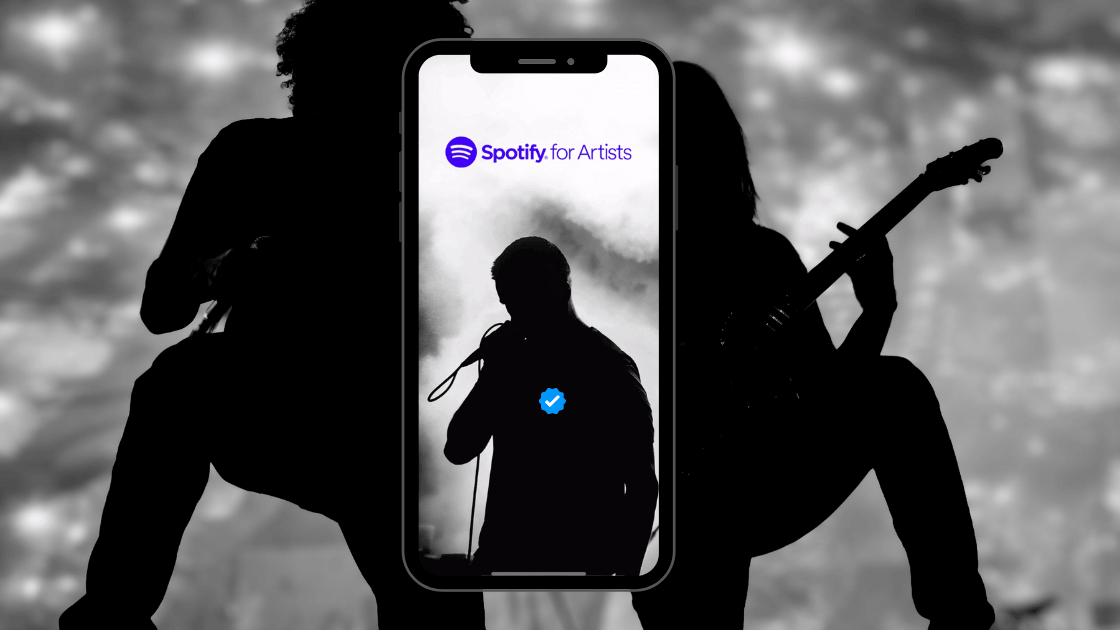
Getting that coveted Spotify blue tick next to your name can significantly boost your presence on the platform. Here’s a comprehensive guide to help you navigate the verification process on Spotify.
Paso 1: Publique su música en Spotify
Before you can get a verified profile, your music needs to be on Spotify. This involves uploading your tracks through a music distributor such as Symphonic, CD Baby, or DistroKid. Ensure your music is live on Spotify before proceeding with the next steps.
in to
If you're using DistroKid, you might wonder how long it takes DistroKid to upload to Spotify. Typically, it takes a few days, so plan accordingly.
Step 2: Log in to your Spotify Account
To start the verification process, you'll need to go to the Spotify for Artists login. You can log in with your existing Spotify credentials or create a new account if you don't have one.
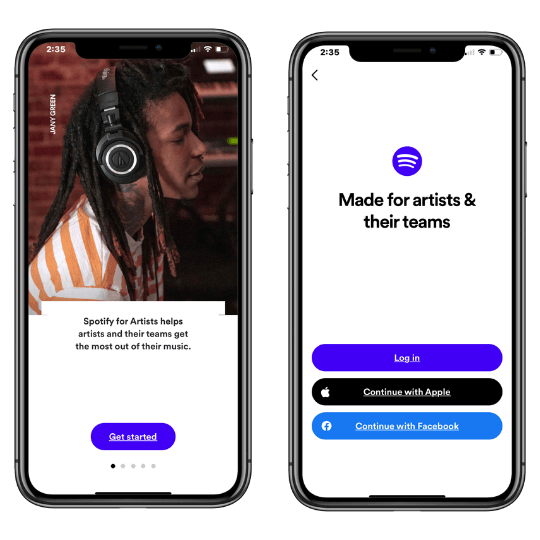
Step 3: Claim Your Artist Profile on Spotify for Artists
After logging in, search for your artist profile by typing in your artist name or pasting a URL link to your Spotify profile. This step ensures that Spotify links the correct profile to your account. Double-check to make sure all the information matches your artist profile.
Spotify will then ask you to identify yourself as an artist, manager, or label team member, and then you can claim your Spotify artist profile.
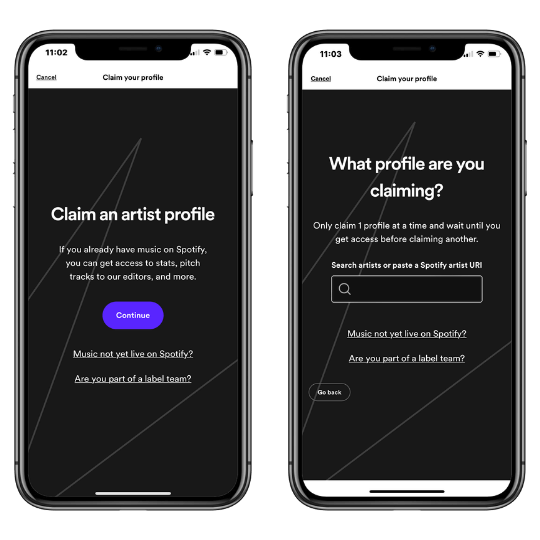
Paso 4: Proporcionar información adicional
After selecting your artist account, Spotify will ask for some basic information to complete your verification. This includes:
Nombre y apellidos
Correo electrónico profesional
Cargo (artista, manager, etc.)
Empresa (si procede)
Esta información ayuda a Spotify a verificar su identidad y conectarle con el perfil adecuado.
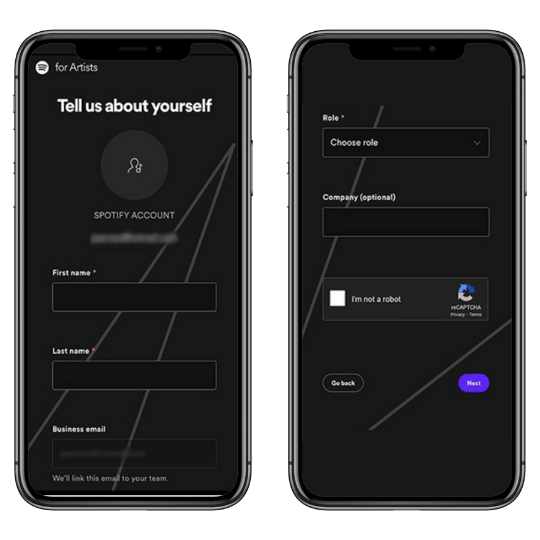
Step 5: Verify Your Spotify For Artists Submission
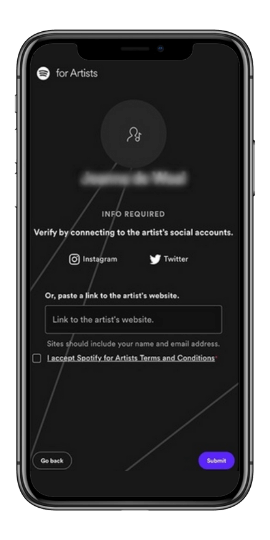
To finalize your verification, you must connect your Spotify account to your social media profiles (Instagram or Twitter) or provide a link to your official artist website.
This step confirms your identity and ensures that you are the legitimate owner of the artist profile. After connecting your social media or website, click “Submit” to complete the process.
What to Expect After Submitting Your Spotify For Artists Verification Request
Una vez que hayas enviado tu solicitud de verificación, Spotify suele tardar unos días en revisarla y aprobarla. Sabrás que has sido verificado cuando aparezca el icono azul Spotify junto a tu nombre de artista en tu perfil. Si se rechaza tu solicitud, Spotify suele dar una razón, lo que te permite corregir cualquier problema y volver a solicitarla.
Ventajas de verificarse en Spotify
Getting the verified tick on Spotify offers several benefits that can enhance your music career.
Mayor credibilidad
El logotipo azul de Spotify significa autenticidad, lo que garantiza a los fans y a los profesionales del sector que tu perfil es legítimo. Esto es crucial para los artistas que se preguntan cómo convertirse en un artista verificado en Spotify.
Personalización del perfil
Spotify Los artistas verificados pueden actualizar sus imágenes de perfil, añadir una biografía e incluir imágenes personalizadas, lo que ayuda a crear una imagen de marca profesional y cohesionada.
Aprende a configurar tu perfil de artista Spotify aquí.
Acceso a las funciones de Spotify para artistas
Los artistas verificados pueden enviar su música inédita a las listas de reproducción editoriales de Spotify, lo que aumenta las posibilidades de aparecer en ellas. También tendrás acceso a análisis detallados de streaming, que te ayudarán a comprender mejor a tu público y a planificar estrategias promocionales.
Selección del artista
Esta función te permite fijar una canción, un álbum o una lista de reproducción en la parte superior de tu perfil. También puedes compartir las fechas de tus próximos conciertos y añadir imágenes personalizadas para mejorar el atractivo visual de tu perfil.
Conclusión
Getting verified on Spotify is a straightforward process that can significantly boost your visibility and credibility on the platform. By following the steps outlined above, you can unlock a range of features designed to help you promote your music and engage with your audience more effectively.
Don’t wait—start your Spotify verification process today and take your music career to the next level. If you need further assistance, the Spotify help page offers detailed guides and support.
FAQS
¿Cómo crear una cuenta de artista en Spotify ?
If you're wondering how to create a Spotify Artist account, start by signing up for a regular Spotify account if you don't already have one. Next, distribute your music to Spotify using a music distributor such as Symphonic, CD Baby, or DistroKid, which will handle the process of uploading your tracks.
Once your music is live, visit Spotify for Artists, log in with your Spotify account, and claim your artist profile by searching for your artist name and providing the necessary verification information.
¿Cuánto tiempo se tarda en ser verificado en Spotify?
En el caso de los artistas, la verificación a través de Spotify para Artistas suele tardar unos días tras enviar su solicitud y obtener la aprobación. La marca de verificación aparece automáticamente una vez concedido el acceso.
¿Cuánto cuesta verificarse en Spotify?
Verificarse en Spotify es gratis. El proceso de verificación es gratuito, tanto si es usted un artista que reclama su perfil en Spotify para Artistas, un podcaster que reclama su podcast en Spotify para Podcasters, o una figura notable que busca verificación.
¿Qué significa estar verificado en Spotify?
Estar verificado en Spotify significa que Spotify ha autentificado tu perfil como genuino y oficial. Para los artistas, esta verificación proporciona una marca de verificación azul junto al nombre de su perfil, lo que indica a los oyentes que el perfil es el oficial de ese artista.
Ayuda a generar confianza entre los fans y puede aumentar la credibilidad del artista. La verificación puede proporcionar acceso a funciones y análisis adicionales a través de Spotify for Artists, lo que permite una mejor participación y gestión de la audiencia.
Cómo convertirse en artista Spotify
Para convertirte en un artista de Spotify , empieza por crear y grabar tu música. Utiliza un distribuidor de música digital como Symphonic, TuneCore o Distrokid para publicar tu música en Spotify.
Una vez que tu música esté disponible, verifica tu identidad y reclama tu perfil a través de Spotify para Artistas. Personaliza tu perfil con una foto, una biografía y enlaces a redes sociales para crear tu marca.
Promociona tu música a través de las redes sociales y otras plataformas como Playlist Push, y envía tus canciones para que se tengan en cuenta en las listas de reproducción a través de Spotify for Artists.
¿Quiere promocionar su música?
Use our Spotify Playlist Submissions or TikTok Promotion service.